Sunday, June 7, 2009

One Laptop Per Two Children

At long last, students are using the laptops in the classrooms!
The first class was pretty fabulous. Despite the fact that most students haven't used any technology more advanced than a cell phone, they are quick learners. I'm excited to see what they will be able to do with these machines as their confidence builds.
The plan is for me to help teach the basic into courses for all the classes and then, when the students are comfortable with Sugar and some of the basic programs, to start helping teachers develop lesson plans that connect to their curriculum (expecially where it can overlap with health and envitonment goals).
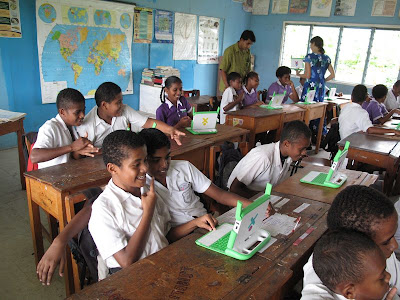
Most of our schools have 20 laptops, even though the average town class size is 30+. Students in these larger classes have to share the laptops. This is culturally appropriate in Fiji, where children grow up sharing everything with their family and community.
And here is a photo taken on one of the laptops. She's pretty excited to see herself reflected in the screen! We walk home from school together and she gave the laptops great reviews.

Thursday, June 4, 2009

Teacher Workshops

I was without my assistant for the teacher trainings, and I was too busy instructing to snap photos to share. Despite scheduling changes and delays, the workshops were a huge success. The schools were challenged this term with the unexpected, mandatory retirement of all teachers 55 and over, effective 30 April. The Ministry of Education didn't actually fill many of the vacancies until this past week, the third week of school. So, some of our teachers have three full hours of XO orientation, and others are wondering how to open the little guy. I'm trying to catch everyone up and keep moving forward as I only have three months left before I leave Fiji.

The teacher trainings were broken into three sessions at each school (we've only started at two of the four schools so far).
Session One: Laptop Handling/ Batteries/ The XO Views/ The Frame/ Starting and Shutting Activities (we used Maze and Record for the first session)/ Mesh Networks (joining a partner in the maze and sharing photos).
Session Two: A review of the first session skills and a Scavenger Hunt through new activities (designed to encourage self-exploration of multitude of activities, including Moon, Speak, WikipediaEN, Write, Chat, Memorize, Help, and Pippy).
Session Three: In-depth exploration of Write/AbiWord. All the details on how to use the word processing software and how to save to the journal and transfer to a USB for printing on a school PC (with a side lesson on how to clean USBs on school computers to reduce the rampant viruses on school PCs). Teachers had to create a document with their photo and type "two truths and a lie." After they finished their work, they were to share their documents with the neighborhood so others could join them and guess which of their statements was a lie. There was much laughter and it made a dry word processing lesson a bit easier at the end of their long school day.
Finally, I distributed a basic "troubleshooting" handout to help them solve common laptop problems that might come up in the classroom.

Overall, I got great feedback from the sessions. They insisted that they wanted to spend more time in teacher trainings before bringing the laptops into the classrooms, but their restrictions due to classroom and extracurriculars made it difficult to schedule times to work together. As teacher attendance in the trainings began to falter, we decided to start using the XOs with the upper classes and to provide teacher workshops as needed/requested.

Friday, May 1, 2009

April

The librarians have started hosting the afterschool classes for library members! I have been co-teaching with them for the past two weeks, but they will be teaching classes without me during the school break. The Intro class just explains basic computer handling, battery life, mesh networks, how to start and stop an activity and how to turn the computer off properly (important for preserving battery life). Future classes will focus on internet research and specific Activities on the XO. AND the first round of teacher trainings began last week. All of the teachers at one school are now familiar with the basics, and we'll be doing follow-up trainings as soon as term two begins. Two other schools are signed up and ready as well. Should be a busyTerm Two for technology education!
Biggest struggles so far have been technical. We definitely have one battery that doesn't work a lick and a laptop that has difficulties with its mouse. I think it may be a lemon, but I'm going to read up on OLPC about their thoughts on such issues. I'm hardly a computer guru, so these little things can feel overwhelming. There certainly isn't another XO repairman anywhere in my vicinity, so I'll have to self-study on the wiki! Thank goodness for laptop.org.

Monday, April 6, 2009

fiji time

The XO progress is slow despite the enthusiasm of everyone who has tried them. Teachers at one school have been using them for three weeks, but the school committee hasn't found the time to meet to approve a fundraiser (for flash drives to reflash as needed, two-pin adaptors and power boards for charging, and wireless routers so they can access the internet). It's about $240 for a school to take on 20 laptops, and that level of fundraising is both reasonable and a good indicator of how invested the teachers and staff will be once they have the laptops. We've given an end-of-April deadline for applications, so we should have a good idea of where they will be after that. I have meetings with two other school committees set up this week.

I'm still learning about the laptops. Trying to work with Blue Print Data to secure internet filtering software to reassure concerned head teachers about the safety isssues of bringing the internet to their school.

Half of the laptops are upgraded to the 8.2 OS, a tedious process that I'll be thrilled to complete. I've run another training of trainers for Rotary club members, Cultural Center employees, and our social welfare officer, and invited so many more who haven't yet found the time to attend. And I just helped the Ministryof Education draft an application for a new volunteer to continue this work beyond my close of service in August. I see so much potential for teachers to use these in their classrooms, but I believe a volunteer might be necessary to keep up the enthusiasm and provide technical support for the first two years.

Hopefully I'll have more news soon!

Friday, January 16, 2009

Despite the Floods...

... we had our first XO courses this week!
We were scheduled to start our trainings this week, and despite valient efforts by the weather (worst flooding in 30 years, 40 inches of rain in 5 days, buses not traveling) we held both of our classes on schedule!

There were a few moments when I was fairly certain this wasn't meant to be:

Obstacle #1: I was at a training on another island last week and my Sunday flight didn't leave because of wind at my destination airport, my Monday flight didn't leave because the departure airport was flooded, and the next round of storms was expected to arrive Tuesday (the day of our course).
Solution #1: I took an overnight ferry Monday night, arriving a few hours before our 11am Instructor's course.

Obstacle #2: When the weather is bad in Fiji, people don't go to work. This is absolutely understandable once you've experienced bad weather in Fiji. If you don't have to go outside, you shouldn't. Attendance at my class was bound to be low.
Solution #2: What we lacked in quantity, we made up for in quality. One librarian, one Ministry of Education Officer, and the Provincial Adminstrator were all in their offices despite the torrential downpours. They are now ready to show you how to begin exploring your XO.

Obstacle #3: The power went out in the library about an hour before my instructor course, and still hasn't been returned. Surprisingly, this is not storm-related. Their power bill wasn't paid. So, we are trying to teach a computer class in the South Pacific in the summer without AC, we can't recharge the XOs from our office, and the wireless router is temporarily useless.
Solution #3: We moved our first Student Course to the PA's conference room. We still don't have a good place to recharge them or internet access, but hopefully the power will come on next week.

Obstacle #4: One of the employees who wasn't coming to work due to weather was the person in charge of contacting at-risk youth to attend the courses.
Solution #4: Thankfully, this somehow happened even in her absence. Without me having to do anything. These laptops are so appealing, and the offer of a free training apparently doesn't come along very often. Even though I had asked them to reschedule the course until Monday with hope that power would be back on, I still had eight students arrive an hour early on Friday! (What a wonderful problem to have!)

All in all, our first course went really well. The librarian who is trained to help instruct the Intro to XO Course was out sick (Obstacle #5, no good solution), so I had to call in a fellow volunteer to act as my extra eyes. But the students learned quickly (about half had never touched a computer before) how to operate Sugar, and they were chatting with each other in no time.
I walked them through the different views, how to join others in Chat, to view the Moon (which we haven't seen for a week because of the clouds), and to explore the Maze, and they taught themselves how to use the Video function. I'm still uncertain about how to use many of the Activities, but I think these students are likely to be teaching me soon enough.

We spent an hour and a half together, and if the batteries weren't draining, I think they could easily have been attentive for another hour, expecially if this Intro also included a first glimpse at the internet. I'll be scheduling a follow-up course with this group as soon as I return from leave at the end of February. Until then, their assignment is to get their library cards so they can access the XOs while I'm away.


Here are some pictures of our first official XO students!

Using the camera to take a picture with a friend...

So intense...
My favorite volunteer helping out with the lesson...


Monday, December 22, 2008

Wananavu! (Nice!)

Ni sa bula! The xo's are hooked up to the wireless!
The telecom gurus worked out the glitches while students gathered for a school break storytelling. After reading a story about a white christmas, we made snowflakes to decorate the library. Tomorrow, they'll be able to look up weather forecasts around the world, search for images of real snowflakes, and do a wikipedia search to learn about snow. What a wonderful holiday gift for these children.
Happy holidays!

Thursday, December 18, 2008

450MB!!!

This is a HUGE file. The wiki info on the 8.2 upgrade says it may take 20 minutes to download the new OS to a USB from the internet. Here, it took about 23 hours. Really. And it took multiple attempts because we have inconsistent power/ connections (so having 23 hours of uninterrupted connection time is rare!)

I know we have slow connections here, but I imagine there are similar problems in other places that are trying to use the XOs. Is it possible to have future upgrades shared in smaller files (more of them, so if a connection falters, you don't loose everything and have to start from the beginning?)

Because we are in Fiji, and because it is the holiday season, folks are not showing up for work. So that broadband connection for the library is not yet up... hopefully before Christmas!